As you and your pet continue to learn your new Boundary Plus Smart System together, please be sure to reference Invisible Fence® Brand's Boundary Plus Smart Owner's Manual and Mobile App for information on how your system works, your transmitter, your Computer Collar® Unit, your SmartShields™ Device, periodic maintenance, troubleshooting, battery disposal and more.
Here is a brief overview of some common alerts that can help you and your pet stay connected inside the boundary.
Control Panel Logo Light Indicator
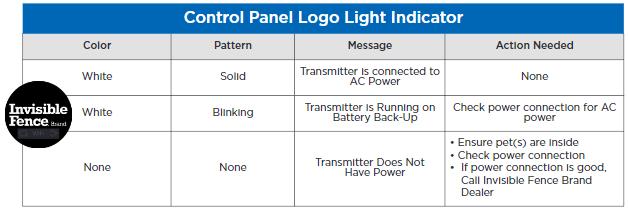
The white Invisible Fence logo on the control panel will indicate whether your transmitter is connected to AC power, running on battery back-up or does not have power. See indicators above to know when action is needed.
Control Panel Wire (Loop) Status Indicator
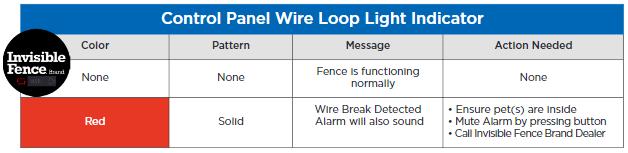
On the bottom left of the Invisible Fence logo, there is a wire (loop) status indicator, which will tell you if the fence is functioning normally or if there is a wire break detected. See indicators above to know when action is needed.
Control Panel WiFi Status Indicator
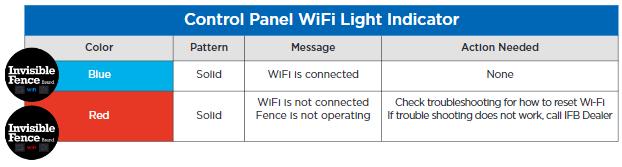
On the bottom center of the Invisible Fence logo, there is a WiFi status indicator, which will tell you if the WiFi is connected or not. See indicators above to know when action is needed.
Control Panel Pet Out of Boundary Indicator
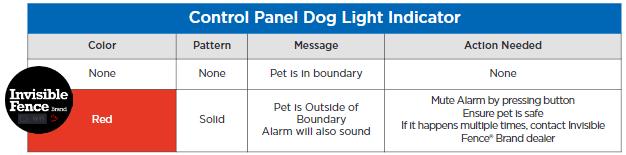
On the bottom right of the Invisible Fence logo, there is a pet out of boundary indicator, which will tell you if your pet is inside or outside the boundary. See indicators above to know when action is needed.
Computer Collar® Unit Status Indicator
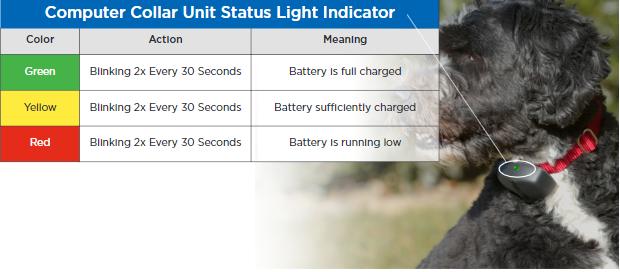
On your pet's Computer Collar Unit, there is a status light, which will tell you if your battery is fully charged, sufficiently charged or running low. See indicators above to know when action is needed.
If you have any questions, please call your local dealer at 800-578-3647
